


SelfyzAI: AI Video Generator
4.31.33K Reviews
App Specs
- Version
- 8.6.3.110122
- Updated On
- License
- Free
- Downloads
- 10,000,000+
- Developer
- Mivo studio
- Categories
- Photography
- Platform
- Android
Screenshots



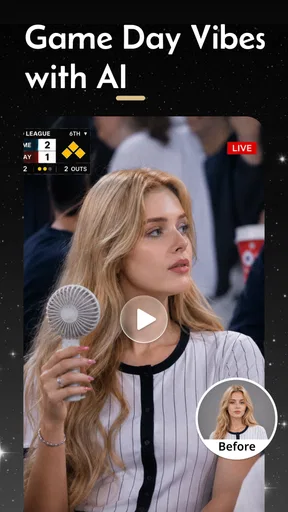
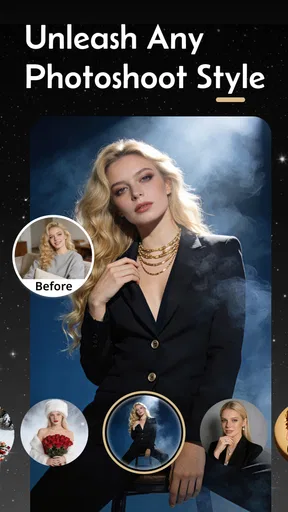

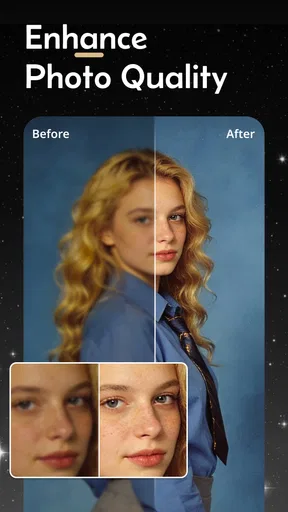
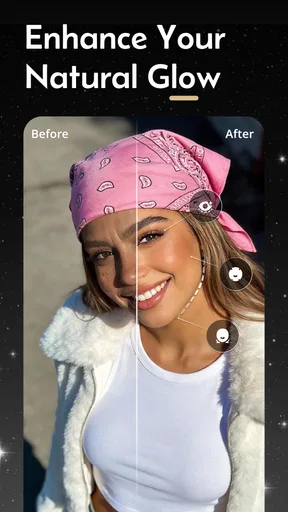
 Analysis by AppCompare
When I’m editing on a phone, I care less about a long list of effects than about how quickly I can get from an ordinary snapshot to something I’m happy to share. SelfyX: AI Photo Editor is built around that kind of casual, hands-on use: it combines automatic photo adjustments with manual controls and playful ways to style an image. I see the appeal most clearly when I have a selfie or a small batch of everyday photos and want to improve them without opening a desktop editor.
What to expect from the editing pace
The automatic approach is useful when I don’t want to start with sliders. I can let the app make an initial pass, then decide whether the result needs a lighter touch or a more noticeable look. That makes the workflow approachable, but “quick” should not mean accepting every suggestion without checking it. AI adjustments can make a picture feel more polished while also pushing it away from the lighting and skin tone I remember, so I recommend comparing the edited image with the original before saving.
For a natural-looking result, I’d treat automatic enhancement as a starting point rather than a final instruction. A small change to brightness or contrast may be all a photo needs; layering strong enhancement, a dramatic filter, and beauty adjustments can make the same portrait feel overworked. I find it more useful to make one kind of change at a time and pause between them. That simple habit gives me a better sense of which edit actually helped.
How it fits a real photo routine
A realistic use for SelfyX is tidying up a selfie before sending it to a friend: start with the automatic improvement, check whether the brightness still feels natural, and try a filter only if it adds something. If I’m preparing photos from a day out, I’d use the collage tools for a small recap rather than editing every image into a different style. Keeping a consistent look makes a set of pictures feel more deliberate, even when each one was taken in different light.
The collage and text options also suit simple personal projects, such as putting a few snapshots together for a birthday message or a group chat. I’d keep the layout and decoration restrained if the photos themselves are the point. Stickers and text can add personality, but they can also compete with faces or details when there is too much going on. A useful trick is to choose the photos first, then decide whether the finished collage actually needs an overlay.
Where the creative tools help—and where they don’t
Filters are handy when I want to set a mood quickly, and recommendations can save me from scrolling through styles that don’t suit a particular image. Still, a suggested filter is a prompt to experiment, not proof that it is the best match. Indoor portraits, bright outdoor shots, and photos with mixed lighting can respond differently to the same look. I’d test a couple of options on the image itself instead of assuming one recommendation will suit every photo in a set.
Beauty adjustments call for a similar light touch. They can be useful when I want a portrait to look a little more finished, but aggressive smoothing can erase the texture that makes a face look like a real person. I’d make the smallest adjustment that achieves the result I want, especially for a profile picture I expect friends to recognize. If my goal is accurate retouching for professional work, I’d rather use a more controlled editor where I can inspect fine details closely.
Worth Reading Before You Choose

EA SPORTS FC Mobile 26 Is a Bigger Football Game, but It Takes Time

Flipboard Shows What News Apps Must Do Beyond the Feed

Switching to Android Auto Means Rethinking Your Driving Routine

Google Calendar Makes a Crowded Week Easier to Manage

Ludo King Makes the Most of the Minutes Between Plans

Baby Panda World Brings Quick Play to Modern Phones, but Its Game Library Feels Busy
Busy sessions, stability, and practical limits
Photo editing can feel heavier when I move from one quick selfie to a collage, several effects, and repeated previews. Those steps ask more of a phone than a single minor adjustment, so I’d keep a sensible workflow: finish one image, save it, and then move on to the next. If an effect takes longer to apply, I would avoid tapping repeatedly while it is working; that can make it harder to tell whether the app is still processing or has stopped responding. Saving in stages is also a practical safeguard against losing a version I already like.
I judge reliability by whether an editor lets me work carefully, not just by how many tools appear on screen. SelfyX’s mix of automatic and manual editing gives me a clear fallback when an AI suggestion is not quite right: I can adjust the image myself or skip that suggestion. For a picture that matters, I’d keep the original and review the saved result before sharing it. That is a worthwhile habit with any mobile editor, particularly when I’ve tried several effects and want to be sure the final version is the one I intended.
There is a trade-off between creative variety and a tidy workflow. A large selection of effects encourages experimenting, but it can also turn a simple edit into a long round of choices. I’d set a goal before opening the editor—natural portrait, playful filter, or compact collage—and stop once the photo meets it. That keeps the process enjoyable instead of making every small image feel like a project.
Unleashing Your Inner Artist
First off, the magic really happens when you dive into the editing tools. SelfyX uses advanced AI to automatically enhance your photos, which is perfect for those of us who might not have the best eye for detail. The app quickly analyzes your photo and suggests improvements that are surprisingly spot-on. It’s like having a friend that always knows your best angles.
Aside from the smart enhancements, you’ve got a whole suite of manual editing tools at your disposal. Want to tweak the brightness or contrast? No problem. Feel like adding a touch of drama with a vignette? Go for it. The app gives you the freedom to customize your photos just the way you like them.
Filters Galore
Okay, let’s talk about filters because who doesn’t love a good filter, right? SelfyX offers a wide variety of filters that can completely change the vibe of your photos. Whether you’re going for a vintage look or something more modern and sleek, there’s a filter for every mood. Personally, I’m a big fan of the retro filters—they give my photos that Instagram-worthy feel without much effort.
But what really sets SelfyX apart is its AI-driven filter recommendations. Based on the content of your photo, the app suggests filters that it thinks will make your image pop. It’s a little eerie how well it works, but hey, I’m not complaining!
Beauty Mode – Because Why Not?
We all have those days when we’re not feeling our best. Enter the Beauty Mode feature. With just a few taps, you can smooth out skin, whiten teeth, and even add a subtle glow to your complexion. It’s all about enhancing your natural beauty without making you look like a completely different person. The results are subtle and flattering, which is exactly what you want from a beauty editor.
For anyone deciding whether to install it, the key question is what kind of photography they actually do. I’d recommend it to people who mainly edit portraits and social snapshots, enjoy trying filters, or want a collage without learning a more complex editing program. It is less compelling if your usual work involves careful color correction, detailed object cleanup, or preparing images for a client. In those cases, a dedicated editor with more precise controls is a better fit than an all-purpose phone app.
Collage and Creative Options
If you’re into creating collages, SelfyX has got you covered. The app offers a range of templates that make it easy to combine multiple photos into one cohesive image. It’s perfect for sharing a series of snaps from a day out or compiling your favorite moments from an event. You can also add text overlays and stickers to give your photos a personal touch.
One useful way to approach a collage is to pick images with a shared subject or moment, then choose a template that gives the main photo enough room. A layout can make a collection feel organized, but it cannot fix photos that clash in brightness or color. I’d make basic adjustments to the individual pictures first and then assemble them. That order gives me more control over the overall appearance and avoids trying to solve every mismatch with decoration.
Plus, the app includes some creative effects that let you play around with double exposures and other artistic looks. It’s like having a mini Photoshop in your hands without the learning curve.
That kind of effect is best treated as an experiment rather than an everyday correction. I’d try it on a duplicate or a photo I can comfortably edit again, then compare the result with a simpler version before settling on one. An artistic treatment can be fun for a post or a personal image, but it may not suit a picture where people want to see the scene clearly. Knowing when to leave an image alone is part of getting good results from creative tools.
Sharing Made Simple
Once you’ve edited your photo to perfection, sharing it with the world is a breeze. SelfyX connects directly to your favorite social media platforms, so you can post your creations in just a few taps. The app also allows you to save your photos in high resolution, which is a huge plus for anyone who likes to print their photos or keep them stored for posterity.
Before sharing, I’d check the saved image at full size if fine details matter, particularly after beauty edits or several effects. A picture that looks balanced on a small screen can feel different when viewed larger. For casual social posts, I would prioritize a natural-looking face and readable text over adding one more effect. If printing is the plan, I’d also keep an untouched original so I can revisit the edit rather than treating the first export as permanent.
And let’s not forget about privacy. SelfyX ensures your photos are stored securely and respects your privacy, which is something we can all appreciate in today’s digital age.
It is sensible to be selective about which personal images I choose to edit or share in any app. I would check the app’s current privacy information and the options shown on my own device before deciding how to handle sensitive photos. That is not a reason to avoid ordinary editing, but it is a good routine when pictures include children, private settings, or other details I would not want widely circulated.
SelfyX is a free photography app from Mivo studio, and its broad toolkit is aimed at quick portrait and social-photo editing rather than specialist image production. It has an average rating of 4.6 from around 145,000 ratings and has passed 10 million installs, which suggests that many people have found a use for its casual approach. The app is rated Teen. Its current version is 8.4.1.110003, and it requires Android 7.0 or later; in-app purchases range from $2.99 to $69.99 per item, so I’d look carefully at any purchase screen and decide whether the free experience already does what I need.
Those purchase options are worth considering if you are only looking for an occasional filter or a one-off collage. I would first try the workflow I actually expect to use—editing a portrait, testing a filter, and saving a result—before spending money. If the tools I want are available without a purchase, there is no reason to pay just because an option is visible; if an item is presented as paid, I’d check exactly what it unlocks before proceeding.
The app has been available since May 31, 2018, and the current Android minimum makes it an option for devices running Android 7.0 or newer. That does not tell me how every phone will handle a demanding edit, since speed and available working space vary by device and by the image being processed. On an older or busy phone, I’d close other demanding tasks, work through edits one at a time, and save between stages. If performance still feels uncomfortable, a lighter editor focused on simple crops and adjustments may be more practical.
Compared with the usual alternatives, SelfyX sits between a basic gallery editor and a more technical photo tool. A built-in editor is often the easiest choice for a crop or a small exposure fix, while a specialist editor makes more sense when I need precise control over a complicated image. SelfyX’s advantage is having portrait enhancement, filters, beauty adjustments, collage layouts, and playful effects together in one place. The compromise is that convenience and breadth do not automatically equal the fine control of a dedicated desktop-style workflow.
In everyday use, I would reach for it when I want to make a selfie feel a little more finished or turn a handful of pictures into a shareable recap. I would skip it for edits where exact color matching, subtle professional retouching, or a highly repeatable result matters more than speed and experimentation. That distinction helps set expectations: it is a casual creative companion, not a replacement for every photography tool.
Overall, if you’re looking for an easy-to-use yet powerful photo editing app, SelfyX: AI Photo Editor is definitely worth checking out. It’s packed with features that make editing fun and accessible, even if you’re not a tech wizard. Give it a try—you might just find yourself spending a little more time perfecting those selfies!
Pros
- Easy-to-use interface for beginners.
- Wide range of AI filters available.
- Quick photo editing capabilities.
- Supports high-resolution image exports.
- Regular updates with new features.
Cons
- Some features require in-app purchases.
- Occasional app crashes reported.
- Limited free version functionality.
- High battery usage during editing.
- No offline editing mode available.
FAQs for SelfyzAI: AI Video Generator
What features does SelfyX: AI Photo Editor offer?
SelfyX: AI Photo Editor is packed with advanced features, including AI-based auto-enhancements, customizable filters, and background removal. It also offers tools for retouching facial features, adding artistic effects, and creating collages. The app is designed to be user-friendly, making it easy for both beginners and experienced users to edit photos seamlessly.
Is SelfyX: AI Photo Editor free to use?
SelfyX offers a free version with basic features and limited access to filters and editing tools. For users who want the full experience, a premium version is available, which includes advanced features, ad-free usage, and exclusive content. Subscription options are typically available monthly or annually, with a free trial period offered to new users.
How does the AI technology in SelfyX enhance my photos?
SelfyX utilizes cutting-edge AI technology to analyze and enhance your photos automatically. The AI can adjust lighting, contrast, and colors to improve image quality instantly. It also offers intelligent retouching options, such as smoothing skin and correcting blemishes, while maintaining a natural look, making your photos stand out with minimal effort.
Can I use SelfyX: AI Photo Editor offline?
While many basic editing features of SelfyX: AI Photo Editor can be used offline, some advanced tools, particularly those involving AI processing, require an internet connection. This is because certain enhancements are performed on cloud servers to ensure high-quality results. Therefore, for the best experience, a stable internet connection is recommended.
Is SelfyX: AI Photo Editor suitable for professional use?
SelfyX is designed with both casual and professional users in mind. It provides high-quality editing tools and features that are suitable for creating professional-grade images. While it may not replace more comprehensive desktop software for all professional needs, it serves as an excellent mobile solution for quick edits and social media content creation.


